Choose Between Faster Translations and Fuller Sentences
Speech recognition waits for a pause before it sends a sentence to the phones. Until now that wait was fixed, unless your preacher spoke Swiss German. Now every church decides for itself: a shorter wait means translations reach the congregation sooner, and a longer wait keeps whole sentences together.
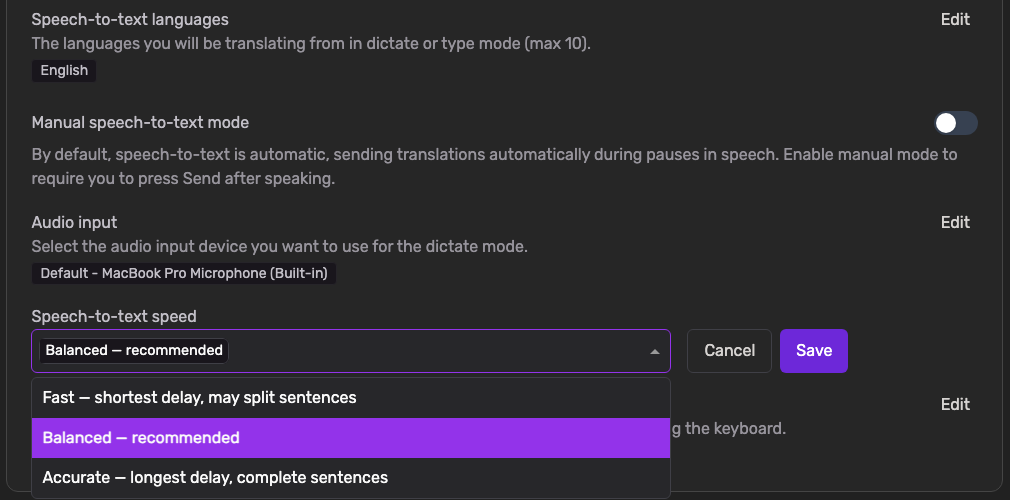
- Three Clear Choices, Every Language: Pick Fast, Balanced or Accurate under Speech-to-text speed. The setting works the same way whichever language you dictate in.
- Fast for Quick Back-and-Forth: Translations reach the phones sooner. That suits short sentences, interviews and announcements. The trade-off: a long sentence can be split at a breath, and half a sentence translates less well than a whole one.
- Accurate for Long, Winding Sentences: Waits longest, so a preacher who pauses mid-thought still arrives as one sentence.
- Nothing Changed Unless You Change It: Balanced is the default and works exactly as before. You won't notice anything until you pick something else.
- Swiss German Joins In: The old millisecond setting for Swiss German is replaced by these three choices. If you had tuned it, we moved you to the closest one: up to 600 ms became Fast, up to 1,500 ms Balanced, anything longer Accurate.
To get started:
- Go to Settings → Speech-to-text settings.
- Find Speech-to-text speed and click Edit.
- Choose Fast, Balanced or Accurate and click Save.
One thing worth knowing: a change applies from your next session. A service that is already running keeps the speed it started with, so try a new setting in the week rather than in the middle of a sermon.