
Changelog

Follow new updates and improvements to Church Translation.

Choose Between Faster Translations and Fuller Sentences

Speech recognition waits for a pause before it sends a sentence to the phones. Until now that wait was fixed, unless your preacher spoke Swiss German. Now every church decides for itself: a shorter wait means translations reach the congregation sooner, and a longer wait keeps whole sentences together.

  • Three Clear Choices, Every Language: Pick Fast, Balanced or Accurate under Speech-to-text speed. The setting works the same way whichever language you dictate in.
  • Fast for Quick Back-and-Forth: Translations reach the phones sooner. That suits short sentences, interviews and announcements. The trade-off: a long sentence can be split at a breath, and half a sentence translates less well than a whole one.
  • Accurate for Long, Winding Sentences: Waits longest, so a preacher who pauses mid-thought still arrives as one sentence.
  • Nothing Changed Unless You Change It: Balanced is the default and works exactly as before. You won't notice anything until you pick something else.
  • Swiss German Joins In: The old millisecond setting for Swiss German is replaced by these three choices. If you had tuned it, we moved you to the closest one: up to 600 ms became Fast, up to 1,500 ms Balanced, anything longer Accurate.

To get started:

  1. Go to Settings → Speech-to-text settings.
  2. Find Speech-to-text speed and click Edit.
  3. Choose Fast, Balanced or Accurate and click Save.
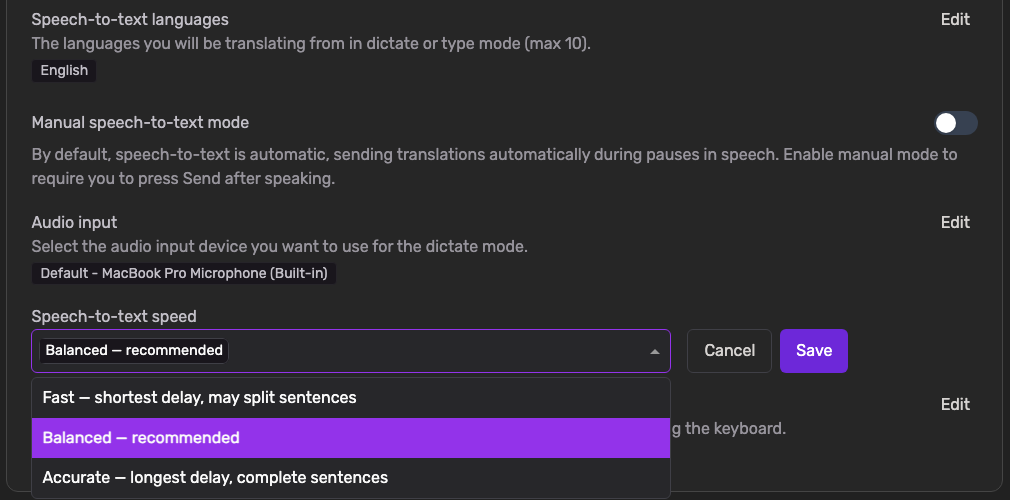
Speech-to-text speed in Settings, open with the three options Fast, Balanced and Accurate

One thing worth knowing: a change applies from your next session. A service that is already running keeps the speed it started with, so try a new setting in the week rather than in the middle of a sermon.
NewAdmin

Stop Paying for Languages Nobody Is Listening To

Church Translation charges per active language, and until now a language stayed on your list forever. One visitor who picked Ukrainian last spring has been adding to the bill at every service since — whether or not anyone read it. This release lets your language list follow your actual congregation.

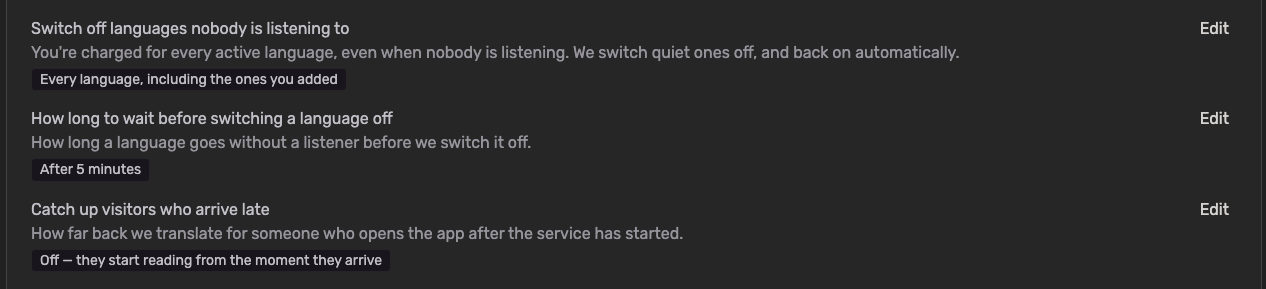
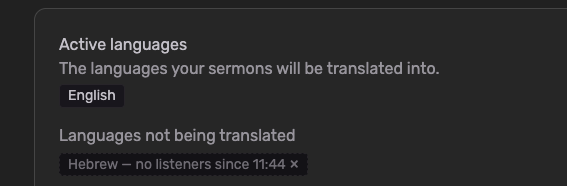
  • Languages switch off when nobody is listening: Set how long a language may go without a listener — anything from 1 minute to 24 hours — and Church Translation switches it off on its own. Nothing is deleted. The language simply stops being translated, and stops being charged.

  • They come back by themselves: The moment a visitor with that language opens the app, it switches back on within seconds. No tap on the language picker, no approval from you, nothing for them to notice.

  • You choose how far it reaches: Switch off only the languages visitors added themselves, or every language including the ones you added yourself.

  • The language you speak is never touched: Your speech-to-text language always stays on. So does a language showing on the projector while you're translating — the projector serves exactly the people who aren't holding a phone.

  • Off for your church until you switch it on: If you were already with us, nothing changes. Your languages behave exactly as they did yesterday until you turn this on yourself.

To get started:

  • Go to Settings → Translation Settings

  • Find "Switch off languages nobody is listening to" and click Edit

  • Choose "Languages visitors added themselves" or "Every language, including the ones you added", then Save

  • Under "How long to wait before switching a language off", pick your window. Churches joining today start on After 5 minutes

  • Optionally, under "Catch up visitors who arrive late", decide how much of the service a latecomer gets translated. This is Off by default, because catching someone up costs translation

One thing worth knowing: the saving comes from not translating into a language nobody was listening to — so the archive for that stretch has nothing in that language to show. Rather than leaving it blank, we show the words in the language spoken at the service, with a short note explaining why. If members of your church read the archive back during the week without ever joining live, a longer window keeps more of it in their own language.

NewAdminMobile app

A Much Bigger Keyword Booster — and Ready-Made Bible Word Lists

The Keyword Booster tells the speech recognition which words to expect, so names like Habakkuk, Nebuchadnezzar or Zerubbabel come out right instead of turning into something else. This release makes it far bigger, and gives you a curated starting point so you no longer have to build your list from scratch.

  • Up to 1,000 Keywords: For most languages you can now add up to 1,000 keywords — a big step up from before. Swiss German supports up to 500. Your limit is shown right in the Keyword Booster, and it adjusts automatically to the language you're working on.

  • Ready-Made Default Lists: We've prepared curated biblical keyword lists of up to 900 words for English, German, Danish, Spanish, French, Italian and Portuguese — book names, people, places and distinctive theological terms, each in that language's own Bible tradition.

  • Load Them With One Click: Open Keyword Booster and click "Load default keywords". The list drops straight into the editor for you to review before saving, so nothing is added behind your back.

  • Nothing Gets Overwritten: Keywords you already added stay exactly as they are — loading the defaults only adds what's missing, and duplicates are skipped.

  • Room Left for Your Own Words: The default lists deliberately stop short of the limit, leaving space for the terms only your church needs — your town, your pastor's name, your ministries, your series titles.

One thing worth knowing: the default lists skip the everyday words (God, faith, grace, prayer) on purpose. Speech recognition already gets those right, and every slot spent on them is a slot not spent on the names it actually struggles with.

ImprovedAdmin

Earlier updates